How do you check whether AI-generated code copied open source code?
No single tool proves AI-generated code is original, so check in layers. Turn on your assistant's public code matching if it has one, search distinctive lines with GitHub code search and a web search, scan the repository for licence and copyright notices with a tool such as ScanCode, and record what you find before you ship.
Cite
CodeLifter Forum, "How do you check whether AI-generated code copied open source code?", https://codelifter.com/forum/posts/how-do-you-check-whether-ai-generated-code-copied-open-source-code/, accessed 2026-11-26.- CodeLifter editorsStaffStaff, CodeLifter ·
Can an assistant reproduce open source code?
Yes, occasionally, and the vendors say so. GitHub's responsible use page for inline suggestions says: "While the probability is low, Copilot may generate code suggestions that match code in the training set." Section J.2 of the GitHub Terms of Service (effective 27 April 2026) adds that output "may contain material that resembles code or content in the model's training data or that is subject to third-party copyrights or open source license terms", and leaves the licence question with you.
Two kinds of match deserve different worry. Short, common code (a loop to 100, a standard
debounce, a fetch wrapper) appears in thousands of repositories in near-identical form because there are only so many ways to write it. Long, distinctive code, with unusual names, comments or structure, is more likely to trace back to one source. Spend your checking time on the second kind.Which checks catch what?
Check What it finds What it misses Copilot public code matching Accepted suggestions that match public GitHub code, with the file URL and licence Code you wrote or edited, private code, code outside GitHub, other assistants' output GitHub code search Exact strings and symbol names in code GitHub indexes Renamed variables, reformatted code, code hosted elsewhere Web search on a distinctive line Tutorials, forum answers, blogs, other hosts Anything not indexed by the search engine ScanCode Toolkit Licence texts, licence notices and copyright statements in your files Copied code that arrived without its notice Your provenance record Where you yourself pasted something from Anything nobody wrote down 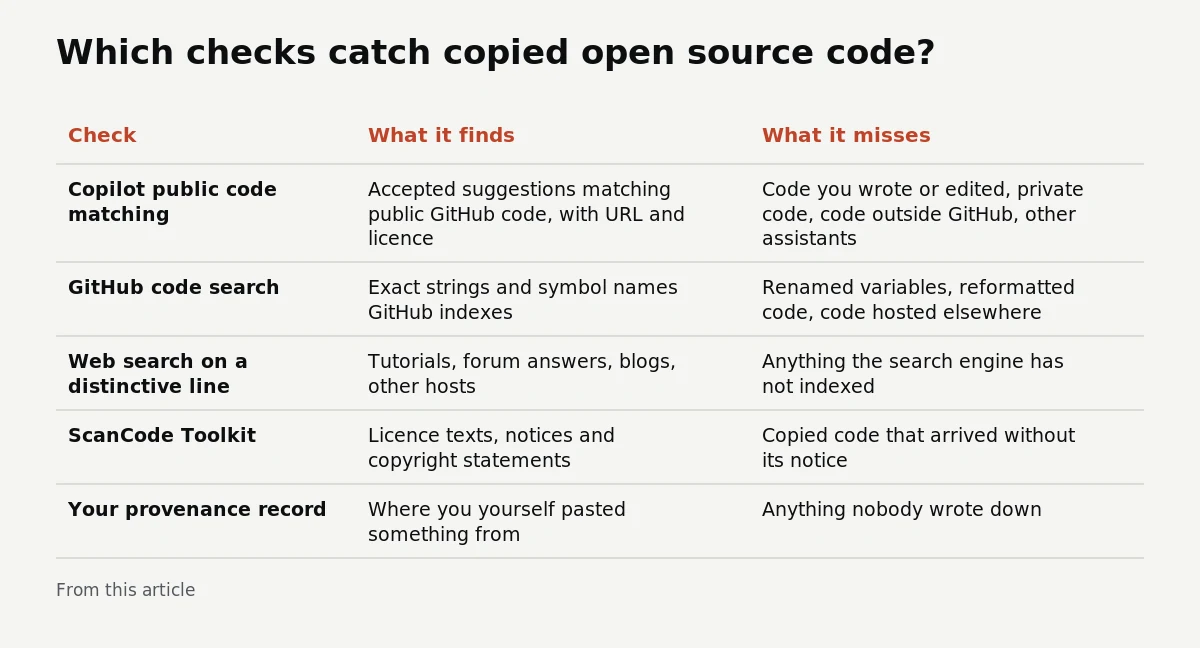
Five checks for copied code and their blind spots, from this article's table How do you read Copilot's matches?
If you use GitHub Copilot, the public code matching setting is under your profile picture, Copilot settings, Suggestions matching public code. Block hides matching suggestions; Allow shows them with references. With Allow, the find matching code page explains where the references land:
- In Visual Studio Code, open View, then Output, and choose GitHub Copilot Log (Code References) in the dropdown.
- In a JetBrains IDE, open Help, then Show Log in Finder/Explorer, open the log (for IntelliJ IDEA,
idea.log) and search for[Public Code References]. - Each entry lists the file and line where you accepted the suggestion, then the matching files on GitHub.com with their licence, or
NOASSERTIONif no licence was found.
NOASSERTIONdoes not mean free to use. Code with no licence is under default copyright. The MIT licence thread covers this feature's index limits in more detail.How do you search GitHub for a suspicious block?
GitHub's code search syntax supports exact strings, symbol names, languages and filters:
- Pick the most distinctive single line: an unusual comment, an odd variable name, a magic number. Whole functions rarely match exactly after formatting.
- Search it in quotes, which matches "an exact string, including whitespace":
"maxRetries * backoffFactor + jitterMs". Escape inner quotes with a backslash. - Narrow it: add
language:javascript, andNOT is:forkto drop copies of the same project. - Search the function name as a definition:
symbol:computeBackoffDelay language:typescript. Symbol search finds definitions only, not calls. - Try a regular expression between slashes if the names may have changed:
/backoff.*jitter/. - Open the oldest-looking result and read its
LICENSEfile. The earliest public copy is your best guess at the source, not proof.
Repeat the distinctive line in an ordinary web search; tutorials and forum answers often sit outside GitHub.
What do you do when you find a match?
You have three options, in rough order of effort:
- Comply. Keep the code and meet its licence: keep the copyright and licence notice, and for permissive licences that is usually enough. Mark the block with
SPDX-SnippetBeginandSPDX-SnippetEndand its own licence line, as the SPDX header thread describes. - Replace. If the licence does not fit your project, delete the block and rewrite the function from its behaviour and tests, without the copy open.
- Swap in a dependency. If the code came from a maintained library, install the library instead of carrying a copy of it.
Record the decision either way, with the source URL and the date you checked; the provenance record thread lists the fields. The CodeLifter desk article on snippet licensing covers code from Stack Overflow and MDN, which carry their own terms.
What can these checks not prove?
A clean result means you did not find a match, not that none exists. Private code, code outside the places you searched and reworded copies all pass. AI code detectors answer a different question, whether a model wrote something, not where it came from; the desk article on AI code detectors covers their limits. What you can show is that you checked with reasonable care, and when.
Short version
- Assistants can occasionally reproduce code from their training data; vendors say so in their own documentation.
- Turn on public code matching where offered and read the reference log for accepted suggestions.
- Search distinctive lines with GitHub code search (
"exact string",symbol:,NOT is:fork) and the web. - Scan for stray licence and copyright notices with ScanCode.
- On a match, comply, replace or swap in the library, and record what you did.
Write something first.
Give people something to work with: at least 30 words on what happened and what you tried.
That is too long. Keep it under 6,000 characters.
Write the question as the title, 15 to 140 characters, no links.
Pick a category.
Add a name (2 to 40 characters, no links).
That email address does not look right.
That was quick. Read the thread, then try again.
The form expired. Reload the page and post again.
Something went wrong with the form. Reload and try again.
Please complete the check and post again.
Limit reached for now. Try again later.
This thread is closed to new replies.
This thread no longer accepts replies.
Something went wrong with the form. Reload and try again.
Post a reply or question first (name and email), then this browser can vote, edit and accept answers.
You cannot vote on your own post.
Only the author (within 30 days) or the forum team can do that.
That email already has an account. Use your sign-in link instead.
New accounts are paused for the moment. Try again later.
That was already posted.